2) Register CaseWORTH™
Once you have successfully installed CaseWORTH you will need to register it for each PC. Start by running CaseWORTH from the desktop icon or <Start> menu. CaseWORTH will ask for your Firm ID and password. The purchase receipt email you received contains this information for your firm.
3) Getting Started with CaseWORTH™
Once you successfully install and register CaseWORTH, take a look at our Training page for five on-demand introductory videos. It will take 1 hour total to watch all five but when you are finished you will be ready to start building your own cases.
When the CaseWORTH program starts up the "Getting Started with CaseWORTH" window will be displayed. It contains quick shortcuts to various training and support resources. We suggest you start by watching the short training video "CaseWORTH Overview - Video Help" (select it and click <Take Me There> on the "Getting Started with CaseWORTH" window).
The "Getting Started with CaseWORTH" window also includes links to a PDF and online version of the "CaseWORTH Quick Start Guide" that will help you use the New Case Wizard to build your first case file.
You may also explore an example of a more complex case by choosing "View the Ronald Smith Sample Case" from the "Getting Started with CaseWORTH" window. Remember, CaseWORTH is designed to allow the user to enter as little detail as they want in a case, or as much detail as a complex case requires. The Ronald Smith sample case is somewhat complex to showcase all the features CaseWORTH offers, but the user is not required to enter that much detail for every case.
As you use the program, remember that each CaseWORTH tab or window contains a <Video Help> button which leads to other short training videos speficic to that screen or feature.
If You Need Help:
We are also available to answer your questions at support@caseworth.com or you may call 501.588.4320.
Back to Top
System Requirements
Notice you must have the Microsoft .NET Framework version 2.0 installed on your PC before installing CaseWORTH. If you don't have .NET 2.0, click here to download it for your PC.
CaseWORTH depends on the Microsoft .NET Framework version 2.0 so CaseWORTH requirements are the same as Microsoft's .NET requirements. In short those requirements are:
- Windows 98/98SE/ME/2000/XP/Vista. (NOTE: CaseWORTH will not work with Windows 95)
- 600Mhz Processor (minimum)
- 128MB RAM (minimum)
- 300MB hard disk space (including 200MB for .NET)
- 800x600, 256 color video display (minimum)
- Internet Explorer (v6+) or FireFox (v2+). (NOTE: CaseWORTH will not work with the AOL browser)
If your PC is running Windows XP, or if your PC automatically installs updates from Microsoft, you probably already have the Microsoft .NET Framework.
If your PC does not currently have the Microsoft .NET Framework installed, the CaseWORTH installation program will attempt to download and install it for you. Please be patient as this is a large file and will take a few minutes to download. If the download Microsoft .NET version 2.0 download or installation fails, then the CaseWORTH installation will also fail. You may choose one of the options below to manually download and install .NET, then start the CaseWORTH installation again.
If you experience installation problems please feel free to contact us at support@caseworth.com.
If you learn more about the Microsoft .NET Framework you can visit Microsoft's .NET 2.0 web page here.
You can also download the Microsoft .NET Framework version 2.0 install program here or here. This install program will allow you to quickly install .NET on multiple PC's in your firm.
Back to Top
Installation Video (3.75 Minutes)
(To start, click the Play button below the video window...)
The CaseWORTH™ Video Help content presented here requires JavaScript to be enabled and the latest version of the Macromedia Flash Player. If you are you using a browser with JavaScript disabled please enable it now. Otherwise, please update your version of the free Flash Player by downloading here.
If you need help, please don't hesitate to contact us at support@caseworth.com or call us at 501.588.4320.
Back to Top
Upgrade Your Firm to Version 2 - It's FREE!
CaseWORTH version upgrades are free for our existing clients. That means if you have CaseWORTH now, you can have this upgrade for free.
If you don't have CaseWORTH, contact us and we will help you get started.
If you already have CaseWORTH, now is a good time to add more workstations. Make CaseWORTH available to everyone in your firm for just $90 per PC per year.
If you wish, we will be happy to help you install the Version 2 upgrade just contact our support department or call 501.588.4320.
The installation is very simple. Simply download the setup.exe to your PC (or server) and run it on each workstation where CaseWORTH is installed.
Be sure to choose the "Repair CaseWORTH" option to avoid having to re-register.
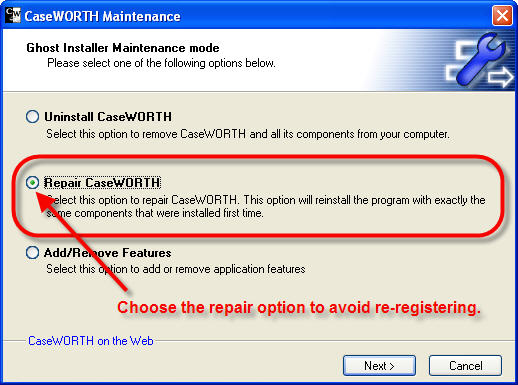
Then keep clicking <Next> to take the default options. If you miss this step and accidentally uninstall CaseWORTH - no problem. Just run the setup again and install it. When you start the program for the first time it will ask for your registration Firm ID and Password.
Remember, we are here to help. If you have any questions or problems with the installation, or the new features, please don't hesitate to email support or call 501.588.4320.
Thank you for using CaseWORTH!
Back to Top |